Written by Lidia Vijga
Someone put 340 million OnlyFans records up for sale, OnlyFans said it never got hacked, and both of those things are true at the same time. Here’s what that contradiction should teach you about protecting your own users, before a stranger builds a database with their name on it.
Search your own product’s name plus the word “breach” right now. If your stomach dropped a little, hold onto that feeling, because it’s the entire lesson in this piece.
What actually happened in the OnlyFans leak
In May 2026, a threat actor using the handle Euphoric_Reply_5727 listed 340 million OnlyFans user records on a cybercrime forum for 0.313 bitcoin (about $24,000). The listing promised usernames, emails, phone numbers, follower counts, content stats, linked social profiles, and a field labeled “card” for the last 4 digits of payment cards. The headlines wrote themselves. OnlyFans, a platform sitting on some of the most sensitive user data on the internet, hacked wide open.
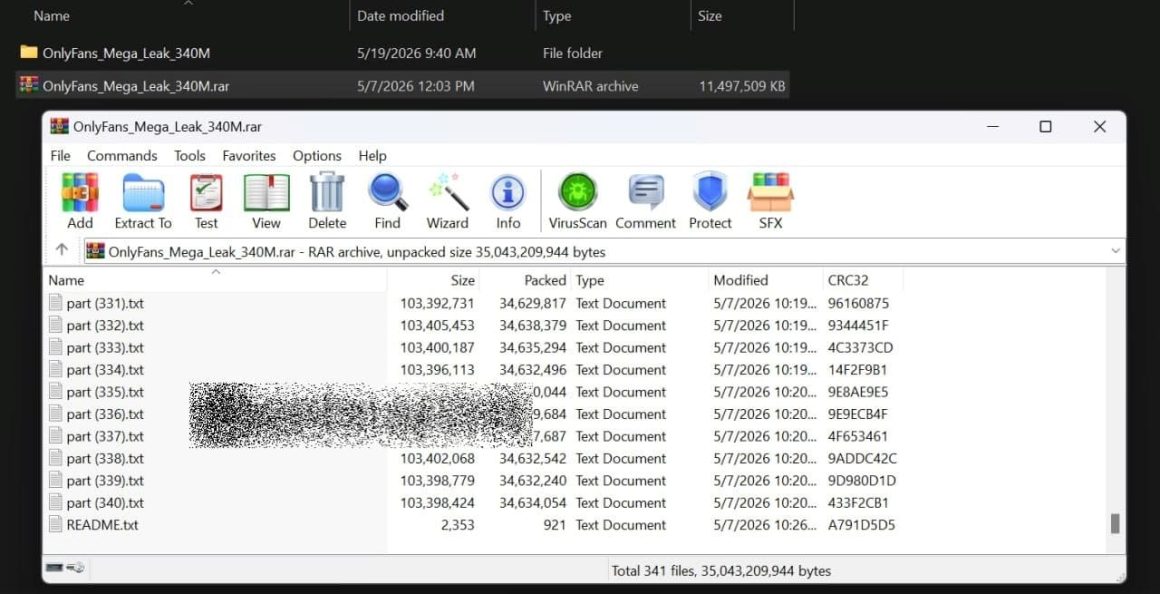
Except it wasn’t. The seller first claimed inside access, then admitted in messages they “didn’t breach or hack OnlyFans.” They took old leaks from X/Twitter, Instagram, and Spotify, matched those records against publicly visible OnlyFans profiles, and stapled the two together into something that looks like a breach.
OnlyFans dismissed the reports as false, and on the narrow question of “did our servers get popped,” they’re right.
Founders keep getting this part wrong. We treat “we weren’t breached” as the finish line. For the person whose data is now in that file, whether it came from a hack or a clever reassembly job makes no difference. Their information is still for sale with your logo on the folder.
Why a leak that isn’t a breach should scare you more
The OnlyFans file is a symptom of a much bigger shift, and the numbers behind it are the reason I’d rework my security roadmap this quarter.
Attackers mostly don’t break down the door anymore. They log in.
IBM’s 2025 Cost of a Data Breach report summed it up: “many attackers are logging in rather than hacking in.”

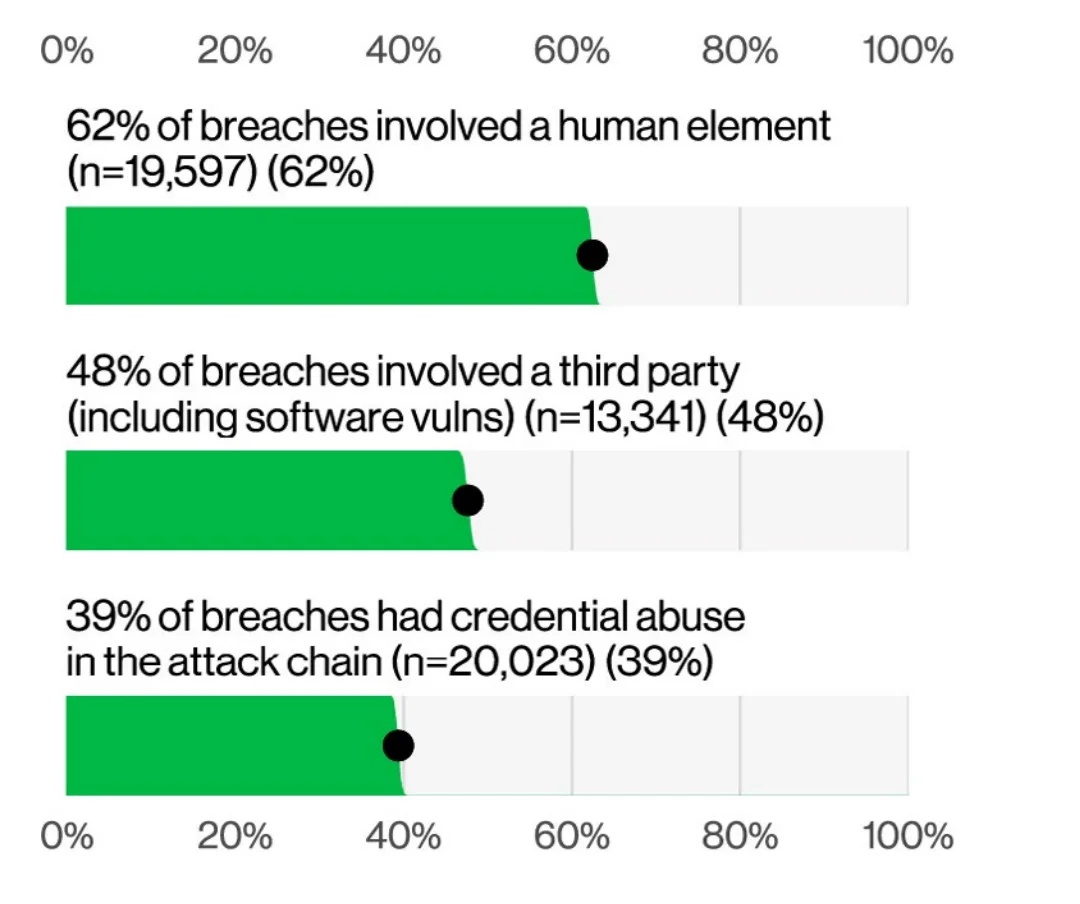
Verizon’s 2026 Data Breach Investigations Report found the human element in 62% of breaches, and stolen or abused credentials still turned up in 39% of them. The front door is your users, and they hand over the keys constantly.
The front door is your users, and they hand over the keys constantly. That’s why “human risk management” has grown into its own category: platforms like Right-Hand run continuous, AI-generated phishing and deepfake simulations against your own team, then nudge people in the moment they slip, instead of the once-a-year training everyone clicks through and forgets.
If most breaches run straight through people, the people are worth defending like infrastructure.
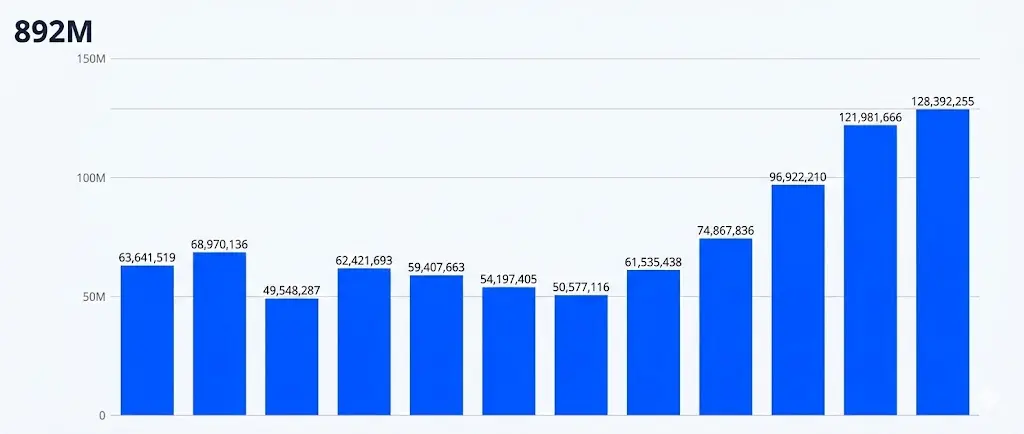
Those keys get stolen at industrial scale, mostly by infostealer malware. Recorded Future indexed roughly 2.95 billion compromised credentials in 2025, with the average infected device giving up 87 stored logins across every account that person had ever touched.
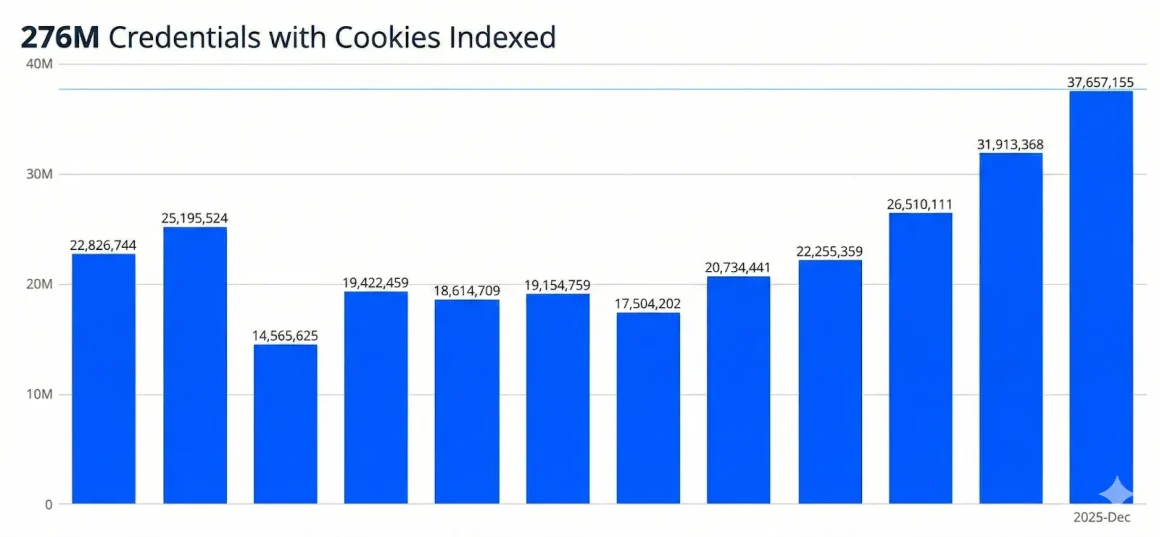
Worse for anyone relying on 2-factor as a safety blanket: 276 million of those credentials came bundled with active session cookies, which let an attacker walk straight past both the password and the MFA prompt.
So the raw material for a “breach” that never touches your servers is already sitting in criminal hands, cheap and searchable. Someone just has to match it to your user list.
That’s the OnlyFans playbook, and it works against any company with public profiles and reused passwords, which is to say, most of us.
What a breach really costs a startup
The cost when it lands on you is real. The global average breach fell to $4.44 million in 2025, the first decline in 5 years, but the U.S. average hit a record $10.22 million.
For a seed-stage company, that average almost doesn’t apply. The real danger is a smaller loss: the kind that drains the runway you fought for and the trust you spent years building. The good news: it’s one of the few risks here you can actually prevent.
But there’s a newer problem that hits startups specifically, because we’re the ones shipping AI features fastest. IBM found that 1 in 5 organizations reported a breach traced to shadow AI, the tools employees adopt without approval, and those breaches ran about $670,000 higher on average.
Among organizations that had an AI-related security incident, 97% lacked proper AI access controls. If your team is pasting user data into whatever model got hot this month, you’re building tomorrow’s aggregation feedstock in real time, and you won’t see it in your own logs either.
The founder playbook I’d run this quarter
Here are the 6 moves that actually change your exposure, each one drawn from a company that learned it the expensive way.
Assume every password is already leaked
23andMe didn’t get its servers breached either. In 2023, attackers ran credential stuffing, logging in with email and password combos leaked from other sites. They cracked only about 14,000 accounts directly, but a relatives-sharing feature let that spill into data on roughly 6.9 million people. The company filed for Chapter 11 bankruptcy in March 2025.
Assume every password your users pick is already on a list somewhere. Screen new passwords against known-breached corpora at signup, and make strong MFA the default, not a setting buried 3 screens deep in account preferences.
Protect the token, not just the password
MFA is necessary and it is also not a force field. When Okta’s support system was breached in October 2023, attackers used stolen session tokens lifted from support files to ride into customer environments like 1Password and Cloudflare without ever entering a password.
If a stolen cookie is as good as a login, then short session lifetimes, token binding, and re-authentication for sensitive actions stop being optional. An active session is a working key to your product, so expire it quickly and make it prove itself again before anything sensitive.
Turn on MFA for the boring backend accounts, where old credentials go to work
The 2024 Snowflake customer breaches hit around 165 organizations, including Ticketmaster and AT&T, and none of it required a Snowflake vulnerability. Mandiant found that 79.7% of the abused accounts had prior credential exposure, many from infostealer infections dating back to 2020, and the impacted accounts simply weren’t configured with MFA.
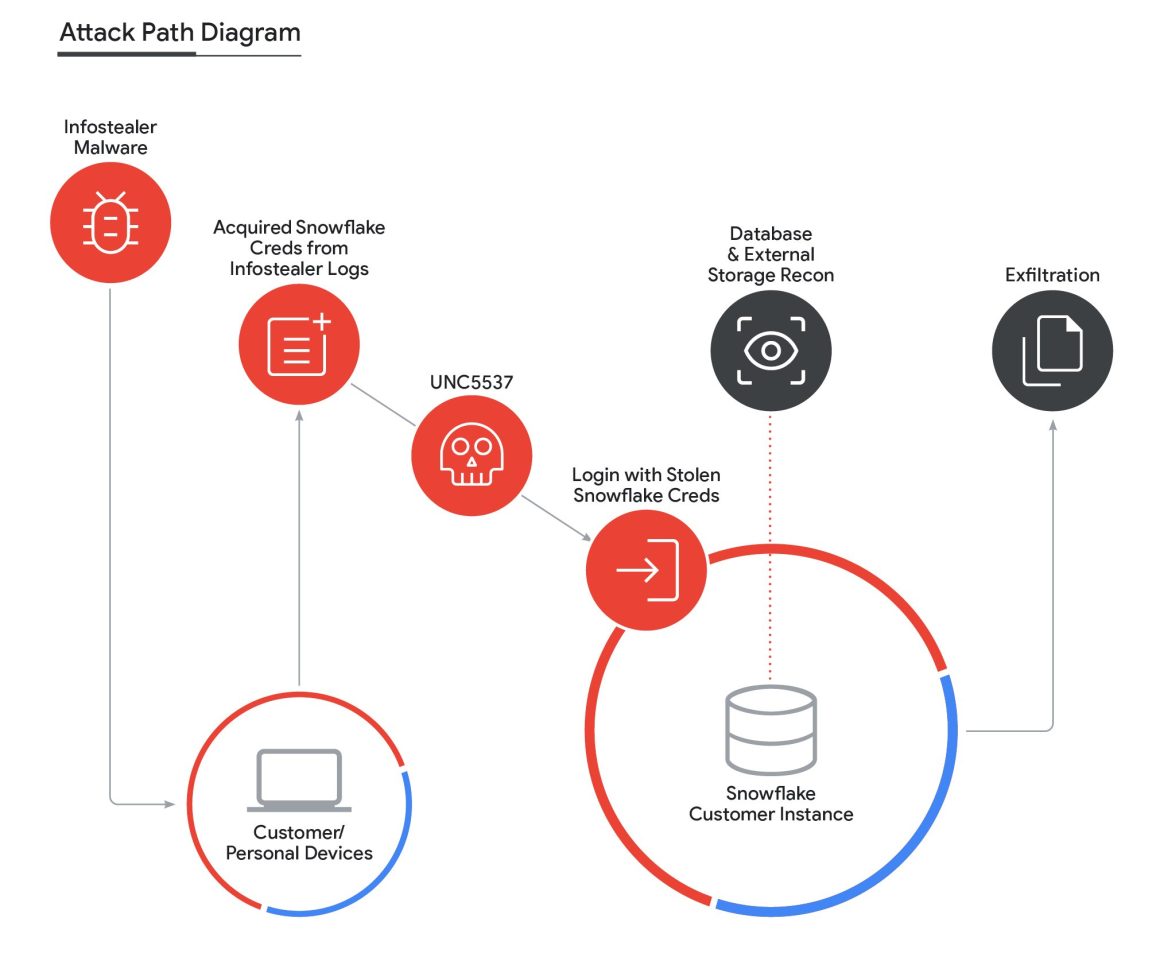
Credentials from 4 years ago still worked because nobody rotated them and nobody added a second factor. Your data warehouse, your admin panel, your CI system: those logins are exactly where a years-old leak becomes today’s incident.
Collect less and expose less, so there’s nothing to reassemble
The OnlyFans file only works because so much profile data is public and so much personal data is already floating around to match it against. Every field you make publicly visible is a field an aggregator can cross-reference. And every optional data point you collect “just in case” is a row in the next database someone puts up for sale.
Map what you actually store, delete what you don’t need, and think hard before you make a username, email, or social handle publicly queryable. Data you never collected is the only data that can’t leak.
Watch for your users’ data in the wild, not just your logs
The OnlyFans seller had that data assembled for weeks before it hit the headlines. If your only tripwire is your own server logs, an aggregation attack is invisible to you until a journalist emails for comment.
That’s the trap: your systems look clean because they are clean, while your users’ exposure grows somewhere you’re not looking.
Run your company’s domains and your users’ email patterns through breach-monitoring feeds like Have I Been Pwned, and if you’re storing anything sensitive, pay for dark web and infostealer-log monitoring so you find out your credentials are circulating before a buyer does.
Recorded Future found that more than half of stolen credentials surface within a week of a device being infected, which means detection speed is the whole game.
Draft your breach statement before you need it
OnlyFans answered a global story with one word, “false,” and technically that was defensible. It also did nothing to reassure the millions of people who saw their platform’s name in a ransom listing.
You can do better in 20 minutes on a calm afternoon than at 2 a.m. during a crisis. Write the holding statement now: what you’ll say, who signs it, how you’ll tell users what to check, and how you’ll explain the difference between “our systems were breached” and “old data was reassembled” without sounding like you’re dodging.
What the OnlyFans breach teaches founders about protecting user data
The strange lesson of the OnlyFans story is that it separates your security effort from your fate. You can do everything right on your own infrastructure and still wake up to your brand attached to a 340 million record file built entirely from other people’s mistakes. That feels unfair because it is.
But it also points at where the leverage actually sits. You can’t stop old breaches from existing, and you can’t force your users to use a password manager. You can make reused passwords useless with MFA and breached-password screening, you can shrink the surface an aggregator has to work with, and you can have your response ready so a bad news day doesn’t become a bad news quarter.
The founders who treat “we weren’t breached” as the start of the conversation instead of the end of it are the ones who’ll keep their users’ trust when the next reassembled file drops.
Every move here is already within your reach, and the trust you protect now becomes the one thing no old leak can ever take from you.
FAQs
No. A threat actor listed 340 million “OnlyFans” records for sale, but they later admitted they never breached OnlyFans. They matched publicly visible OnlyFans profiles against credentials from older Twitter, Instagram, and Spotify leaks, then packaged the result to look like a hack. OnlyFans called the breach reports false.
The listing claimed usernames, email addresses, phone numbers, join dates, follower and content stats, linked social profiles, and a field for the last 4 digits of payment cards. Researchers matched some records to real public profiles, but parts of the data were incomplete or unverified, which is common with reassembled datasets.
Assume any password you reused on older sites is already compromised, change it, and turn on multi-factor authentication everywhere you can. Check your email against a breach-monitoring service like Have I Been Pwned. If you used one password across multiple accounts, update it on all of them, not just the obvious one.
Yes. Even if your servers were never touched, your users’ data is circulating under your brand, and the reputational hit and support load land on you either way. That’s why collecting less data, exposing less publicly, and having a response plan ready matter as much as your firewall.
Attackers increasingly log in with stolen credentials instead of hacking in. Enforce multi-factor authentication, screen new passwords against known-breached lists, collect and expose less user data, monitor for leaked credentials in the wild, and write your breach statement before you ever need it.